A board that's yours
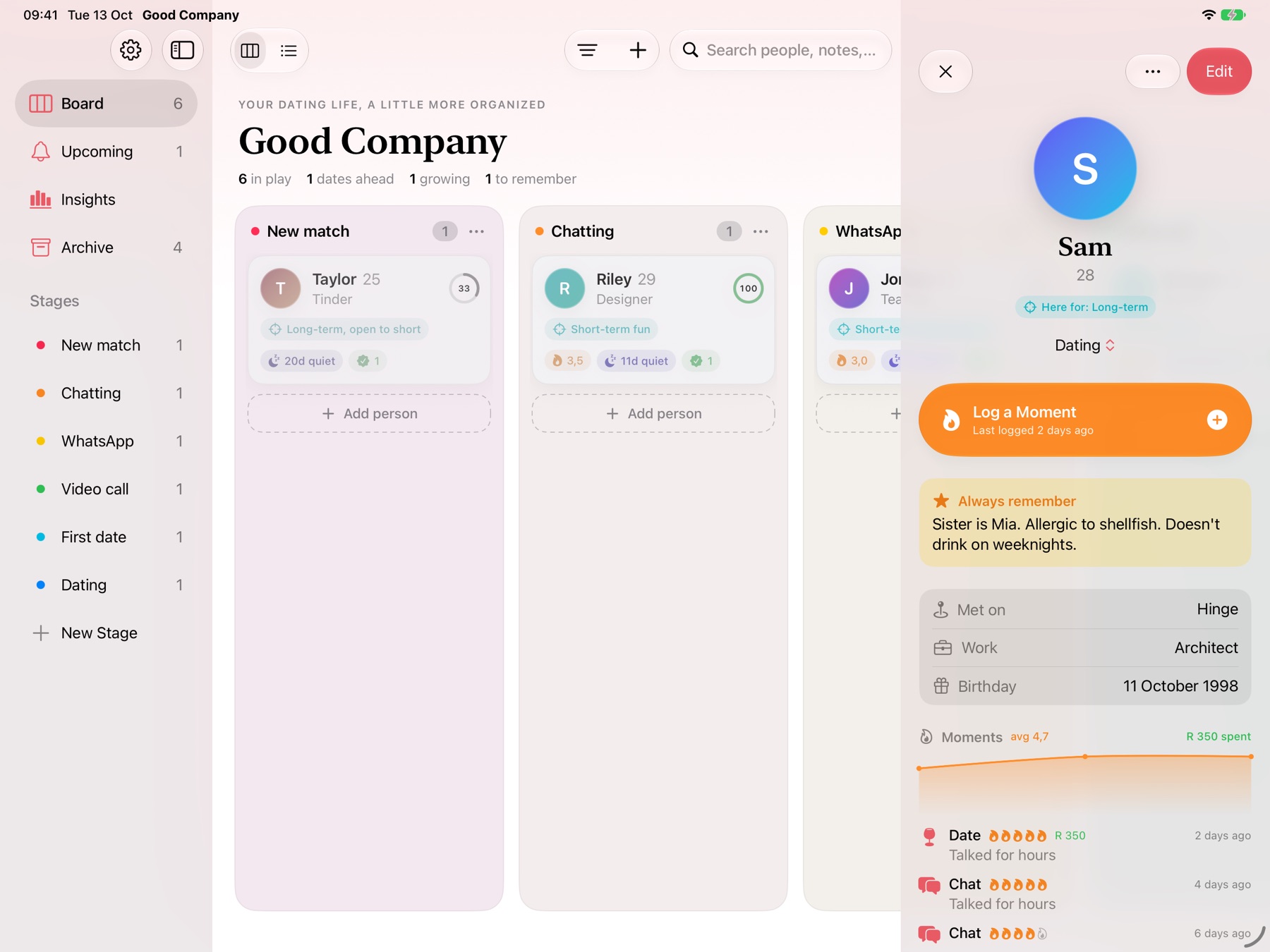
New match, Chatting, First date, Dating, or whatever stages fit you. Drag people between columns, or switch to a list and sort it any way you like.
Keep good company.
Keep track of everyone you're talking to, log every date and how it felt, and remember the little things. Like a dating journal and a personal CRM in one, without anything leaving your device.
Locked with Face ID. No account. No dating app logins.
What it does
New match, Chatting, First date, Dating, or whatever stages fit you. Drag people between columns, or switch to a list and sort it any way you like.
Record chats, calls, dates and more with a one-to-five spark rating and what each date cost. Cards slowly fade when a conversation goes quiet.
An “always remember” note for the things that matter every time, a “next time” note with a reminder, and likes, dislikes and shared interests you can star.
Set your own must-haves and dealbreakers once. Tick them off for each person and their card shows a match score.
Know their age but not their birthday? Add the day later and Good Company works out the year, then reminds you three days ahead.
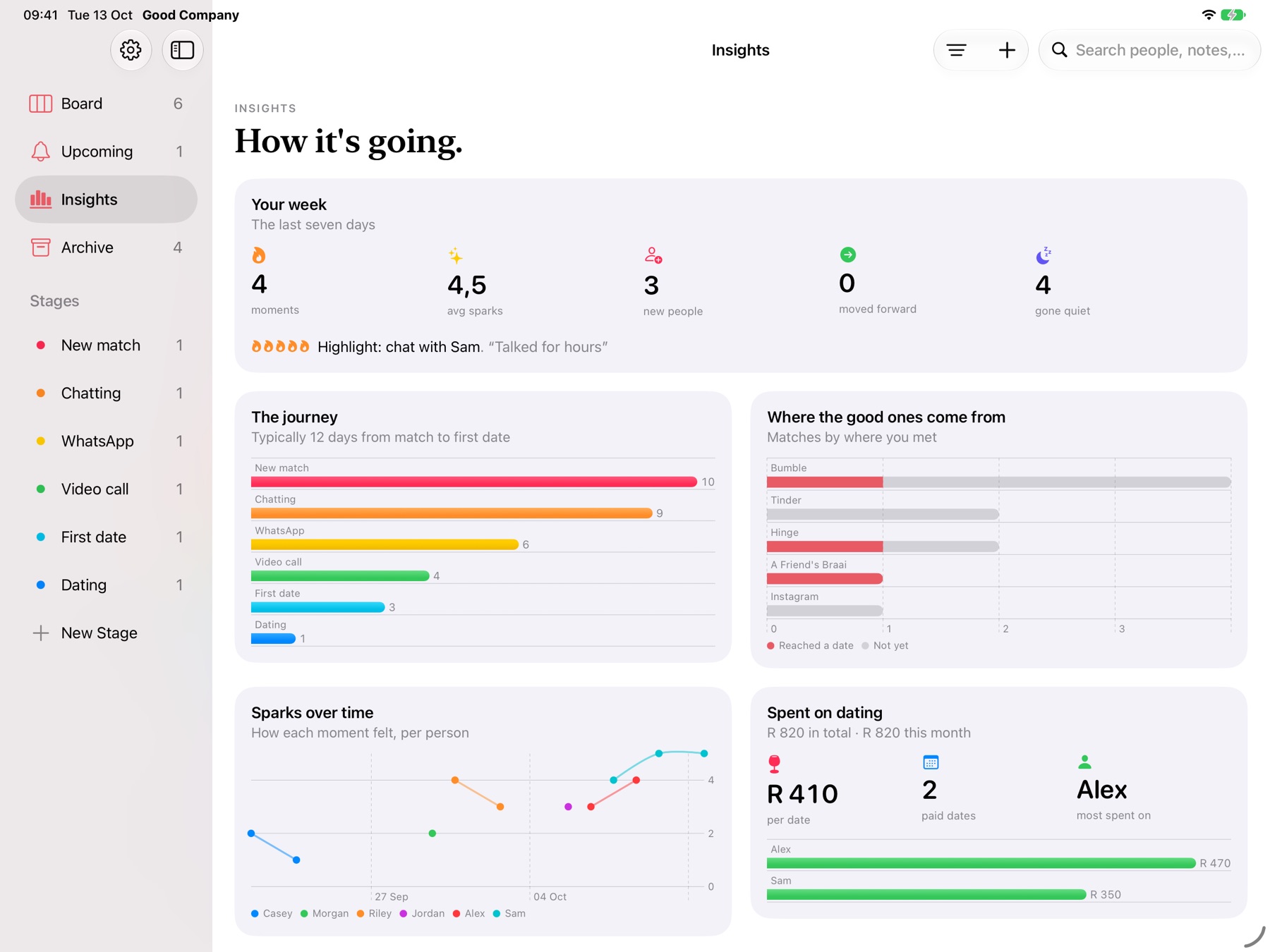
Which apps bring the best matches, how long it takes to reach a first date, where things fizzle, how much you've spent and how your week went.
Your own stages from New match to Dating. Move people along as things progress and celebrate when someone makes it all the way. Conversations that go quiet fade, so you know who to check in on.
After each moment, rate how it felt in sparks, add a note and what the date cost. Each profile shows the trend, and five sparks gets confetti.
Likes, dislikes and shared interests, green and red flags, an “always remember” note and what to bring up next time. Star the details that matter and they show on their card.
Your week at a glance, how long it takes to get to a first date, which apps bring the best matches, where things fizzle and how much you've spent on dating.
Private by design
Questions
A dating tracker keeps everyone you're talking to in one place: where you met, what stage things are at, what you talked about and how each date went. Good Company does that as a private board on your iPad or Mac, with notes, reminders and insights, so nothing slips through the cracks.
Add each match to your board when you start chatting, note where you met (Hinge, Bumble, Tinder, a friend's party) and move them along as things progress: chatting, WhatsApp, video call, first date, dating. Log each chat, call or date with a spark rating, and Good Company shows who's gone quiet and who's worth a second date.
No, on purpose. Good Company never logs in to dating apps or reads your messages, so there's nothing to break and nothing to leak. You add what matters yourself, which takes seconds.
Yes. Everything is stored only on your device. There's no account, no server and no analytics, and you can lock the app with Face ID or Touch ID so it locks whenever you leave it.
Yes. When you log a date you can add what it cost. Each profile shows what you've spent on that person, and Insights shows your total, this month and the average per date.
In a way: it's a personal relationship manager for dating, with stages, notes, reminders and a match score from your own must-haves and dealbreakers. It just feels a lot warmer than a spreadsheet.
iPad and Mac, running iPadOS 26 or macOS 26 and later. It's coming soon to the App Store.

Coming soon to iPad and Mac.